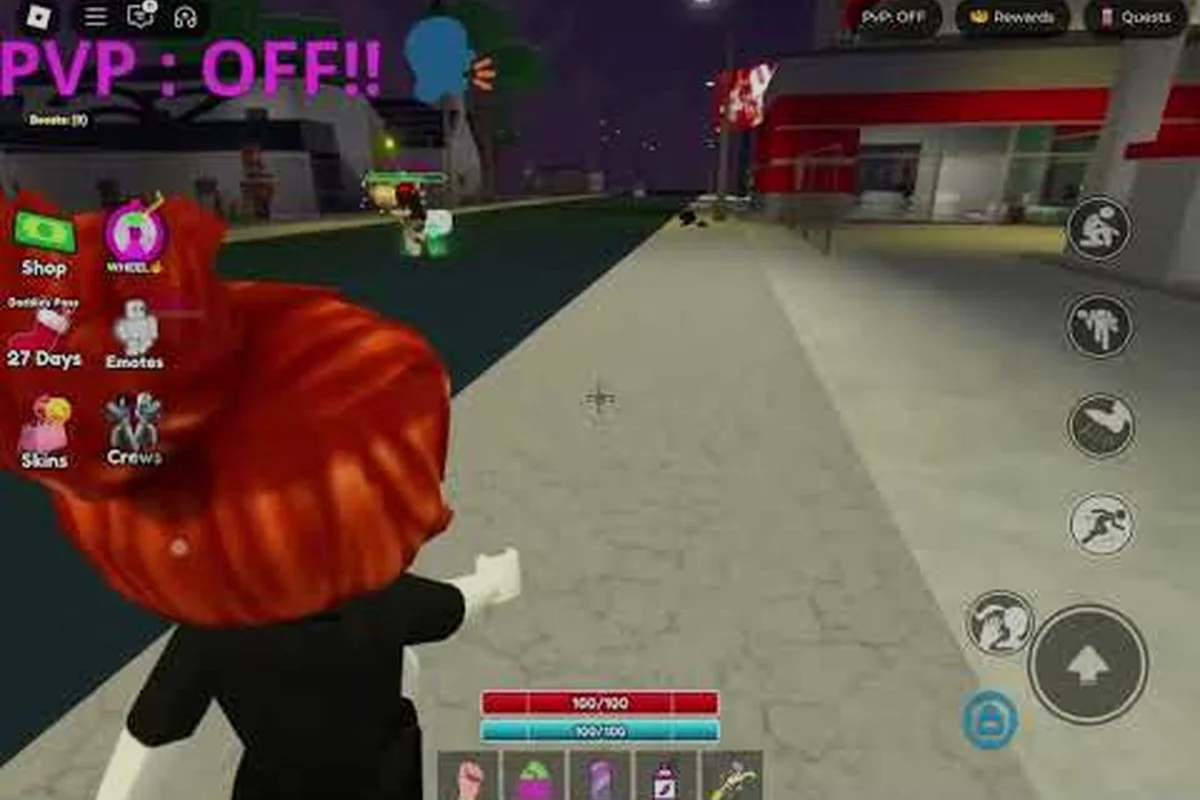
Baddies customization runs through a single avatar button in the top-right of the screen, so you can swap skins, layer makeup, and rework hair between rounds without ever leaving the server. Editing on the fly matters because every permanent cosmetic you equip — from High Heels to Baddie Mask Anonymous — changes how other players see you and, in several cases, how the fight itself plays out. This guide walks through every layer of the system so your look matches your playstyle from the very first lobby.
Understanding the Baddies Customization Hub
The avatar editor in Baddies sits behind the small figure icon tucked into the screen's upper-right area, and it opens in a side panel that overlays the live server. According to the official Baddies Roblox page, the editor is designed so that players can tweak their look mid-round without dropping out of the match or losing their spot in the queue. Everything you change applies instantly, which means you can test a new wig in a live 1v1, decide it looks wrong, and swap back before the next respawn.
The editor is split into a handful of tabs that line up with the major cosmetic categories: Skins for body color and skin tone, Hair for wigs and head accessories, Makeup for face overlays, Outfits for layered clothing, and Accessories for everything from purses to masks. Free players see the same tabs, but most paid items carry a small Robux tag that opens the gamepass store when tapped. According to community testing shared on the Baddies Discord, the panel occasionally desyncs after a quick respawn — reopening the avatar button fixes the visual glitch in most cases.
The cosmetic layers stack on top of each other in a fixed order, and that order matters for clipping. Skins sit at the base, then Hair, then Makeup, then Outfits, then Accessories on top. If your wig clips through a hat, you usually need to swap the order by changing which item sits in the Accessories slot versus the Hair slot. Players who want a clean silhouette usually keep accessories to three or fewer items, because the model tends to break past that point.
| Tab | What It Edits | Free or Paid | Applies Live? |
|---|---|---|---|
| Skins | Body tone, face shape | Free + paid tones | Yes |
| Hair | Wig color, length, style | Free + paid wigs | Yes |
| Makeup | Lip color, blush, eyeshadow | Free + paid | Yes |
| Outfits | Tops, bottoms, shoes | Free + paid | Yes |
| Accessories | Purses, glasses, masks | Mostly paid | Yes |
Saving is automatic the moment you close the panel, and the game does not ask you to confirm. If you want to revert a risky change, the safest workflow is to screenshot your look before editing so you can rebuild it piece by piece.
Baddies Skins, Makeup, and Hair: The Free Layers
The three base layers — baddies skins, baddies makeup, and baddies hair — are where most players spend their first hour. The free options in each tab are more limited than the paid catalog, but they're enough to build a recognizable look and they unlock the moment you join a server for the first time.
Skin Tones and Face Shapes
The Skins tab lets you pick from roughly a dozen base tones and a smaller set of face presets. Free players get the standard range, while the gamepass store adds lighter "glass" and darker "espresso" tones that read clearly under most lighting conditions. Face shapes are limited to a handful of presets, but you can rotate the camera in the editor to check how a tone reads in different lobby lighting before committing.
A small but useful tip from community creators: darker skin tones pair better with bold lip colors in the Makeup tab, while lighter tones look cleaner with softer blush overlays. The Skins tab also controls the color of your hands and neck, which matters if you plan to wear sleeveless tops — a mismatch between arms and face is the single most common clipping complaint in beginner screenshots.
Makeup Presets and How They Stack
The Makeup tab ships with several pre-made looks and a smaller set of slot-based colors. Each preset stacks across four layers: lips, blush, eyeshadow, and a face overlay like freckles or a beauty mark. The presets auto-fill all four layers, while the slot system lets you pick a lip color, then a blush, then an eyeshadow, then an overlay one by one.
Permanent Makeup is a paid cosmetic that unlocks the full set of high-tier lip and blush colors. According to the official game page, it also blocks the visual effect of pepper spray, which is the only makeup item with a confirmed mechanical side effect. Players who main the Baddies makeup slot for style alone can ignore the gamepass; players who main it for the pepper-spray block need the paid version.
| Makeup Layer | Free Options | Paid Highlights | Mechanical Effect |
|---|---|---|---|
| Lips | 6 colors | 18+ via Permanent Makeup | None |
| Blush | 4 tones | 10+ via Permanent Makeup | None |
| Eyeshadow | 5 tones | 12+ via Permanent Makeup | None |
| Face Overlay | Freckles, marks | Animated overlays | None |
| Pepper Spray Block | None | Permanent Makeup | Confirmed |
Hair and Wig Swaps
The baddies hair tab is split into wigs and hair colors. Free wigs include a short bob, a ponytail, and two longer straight styles; paid wigs add curls, braids, and the long "rapunzel" set that reaches past the avatar's waist. Colors range from the standard black and brown to pastel pinks and blues that show up clearly on the mini-map.
The wig tab also controls head accessories like headbands and small hats, which sit in the same slot. If your headband disappears when you equip a wig, you have to choose between the two because they share a render layer. Wig locks — a paid feature — prevent your hair from being knocked off during a fight, which matters for players who want their look to survive a long match. The full Baddies how to get accessories guide covers the exact Robux cost of the wig lock and which wigs it covers.
Baddies Outfits: Building Looks From the Ground Up
Baddies outfits are where individual pieces stop mattering and a real "baddie" look comes together. The Outfits tab pulls from the same item pool as the standalone clothing shop, so anything you own in your Roblox inventory can be layered into a Baddies loadout as long as it fits the avatar's body type. The trick is understanding the layering order and how each slot clips with the next.
Slot-by-Slot Layering
The Outfits tab has six slots: top, bottom, shoes, outerwear, dress (which replaces top and bottom), and a secondary accessory layer for things like chains or belts. Each slot accepts one item, and items that overlap visually will clip in predictable ways. Long tops over short bottoms always show the bottom hem; tight tops over wide bottoms usually clip at the waist.
High Heels are the most famous shoes in the game because they double stomp damage when equipped. According to the official store page, the paid version is permanent and stacks with any other shoe cosmetic, which is why almost every tryhard loadout includes them. Free players get a similar heeled boot, but the damage bonus is smaller and the visual is less pronounced.
| Slot | Free Picks | Paid Picks | Clipping Risk |
|---|---|---|---|
| Top | Crop tees, tanks | Branded sets, mesh tops | Low |
| Bottom | Jeans, shorts | Skirts, ripped denim | Medium at waist |
| Shoes | Sneakers, basic boots | High Heels (doubles stomp) | Low |
| Outerwear | Hoodies | Fur coats, varsity jackets | High at shoulders |
| Dress | Sundress | Bodycon, latex | Replaces top + bottom |
| Accessory | Belts, chains | Designer pieces | Low |
Building a Cohesive Palette
A clean baddie outfit usually sticks to a two- or three-color palette and avoids clashing patterns. Community creators who publish lookbooks on TikTok tend to start from a single accent color — usually the wig — and pull the rest of the outfit from that anchor. The most common palettes in 2026 are pink-and-black, all-white, and denim-on-denim, with neon greens and purples showing up in seasonal event servers.
Texture contrast is just as important as color. A latex top with a denim bottom reads as a deliberate combo, while a mesh top with another mesh top usually looks like a bug. If you want to test a palette quickly, save the look, jump into a private server, and screenshot it from the front and back. Players who skip this step usually regret a clashing piece once they're in a real lobby. The full Baddies cute outfits guide has a longer list of palette formulas and occasion-based looks if you want a starting point beyond the basics.
Baddies Accessories and the Baddies Mask Anonymous Unlock
Baddies accessories are the highest-impact layer because they include the items with real mechanical effects. The Accessories tab covers everything from purses and glasses to leashes and the famous Baddies Mask Anonymous, which is the only cosmetic in the game that hides both your username and your health bar from other players.
What Accessories Actually Do
Most accessories are pure visual flair, but a handful of paid items change how the game reads your character. The full list of mechanically relevant accessories is short, and knowing which ones matter saves you from wasting Robux on cosmetics that look expensive but do nothing in a fight.
| Accessory | Cost | Mechanical Effect | Visual Effect |
|---|---|---|---|
| High Heels (permanent) | Robux | Doubles stomp damage | Heeled boot model |
| Permanent Makeup | Robux | Blocks pepper spray visual | Full makeup set |
| Baddie Mask Anonymous | Robux | Hides name + HP bar | White featureless mask |
| Dog Leash | Robux | None confirmed | Leash prop on hip |
| Stanley Cup | Robux | Cosmetic only | Gold tumbler prop |
| Wig Lock | Robux | Prevents hair knockoff | Locks current wig |
Unlocking the Baddie Mask Anonymous
The baddies mask is a paid gamepass, and it sits in the Accessories tab under a locked icon until you buy it. Once unlocked, equipping it hides your display name above the head and removes the green HP bar that normally floats over your character. According to community testing shared on YouTube by creators like its_GIRLY in "How to equip skins in baddies", the mask does not affect how the game calculates damage — it only changes what other players can see, which makes it a strong psychological pick in 1v1 lobbies where reading HP is part of the mind game.
A few practical notes from players who main the mask: it stacks with any other accessory, it does not block the respawn death effect, and it does not hide you from the kill feed. If you want full anonymity, the mask is the only cosmetic that does the job. The Baddies Robux items guide breaks down the price of every gamepass mentioned here and ranks them by real Robux-per-value.
Saving, Sharing, and Reusing Baddies Looks
The Baddies editor lets you save up to a handful of named loadouts, which is the single most useful feature for players who switch between server types. A "tryhard" loadout with High Heels and the Baddie Mask Anonymous plays very differently from a "cute" loadout with a pink wig and a sundress, and switching on the fly is a few clicks once you have the presets saved.
Saving and Naming Loadouts
Saved loadouts are stored on the same Roblox account, so they follow you across servers and even across different games that share the avatar system. The editor lets you name each preset, and community creators tend to use functional names like "1v1 tryhard," "public lobby clean," and "event drop" rather than aesthetic names. Functional names make it easier to grab the right look in the middle of a respawn timer.
If you want to back up a loadout before a major patch, screenshot every tab — the editor does not currently export a share code, and players who relied on the old Roblox avatar export tool have had to rebuild their saved looks by hand after each major update.
Where to Find Inspiration
Community creators publish Baddies lookbooks on TikTok, YouTube Shorts, and Roblox profile pages. The most cited 2026 references include Zoeyx's "Baddie Brookhaven Outfit" video, which breaks down a pink-and-black palette, and StAr's "Baddie #capcut #robloxedit" short, which focuses on layering a wig with the Baddies Mask Anonymous. Both creators use items that are available in the standard Baddies shop, so the looks can be copied without waiting for a limited drop.
A few practical rules from the creator community: avoid stacking more than three accessories, keep your palette to two main colors plus one accent, and always check the back of the avatar in a private server before saving. Following those three rules cuts clipping complaints by a wide margin and is the fastest way to a clean profile. For a deeper look at cosmetic items with real mechanical impact, the Baddies weapon damage guide covers which weapon skins are worth swapping onto your loadout and how skin choices interact with the avatar editor.
Frequently Asked Questions
Where do I find the Baddies customization menu?
Open the small avatar figure icon tucked into the screen's upper-right area. The editor opens as a side panel that overlays the live server, so you can change skins, makeup, hair, and accessories without leaving the match. Closing the panel saves your changes automatically.
Do Baddies skins cost Robux?
The base baddies skins are free and include several skin tones and face shapes. Paid tones and animated overlays cost Robux, but they are cosmetic only and do not change damage or movement speed. The Baddie Mask Anonymous is the one skin-adjacent item with a confirmed mechanical effect.
Can I hide my username with Baddies Mask Anonymous?
Yes, the baddies mask is the only cosmetic in the game that hides your display name and your floating HP bar. It costs Robux, sits in the Accessories tab, and stacks with any other accessory. The mask does not remove you from the kill feed, so other players can still see when you take a round.
Is Permanent Makeup worth the Robux in Baddies?
Permanent Makeup is worth it if you fight players who main pepper spray, because it blocks the visual effect that normally blinds your screen. It also unlocks the full set of high-tier lip and blush colors, so it doubles as a style upgrade. Players who do not run into pepper spray often can skip the gamepass without losing match performance.
How many Baddies outfits can I save?
The editor lets you save a small number of named loadouts, and they sync across servers on the same Roblox account. Community testing suggests three to five saved slots depending on platform, and the editor does not currently export a share code. Players who need more presets usually screenshot extra looks and rebuild them by hand after a major patch.